AI took my job again. Or did it?
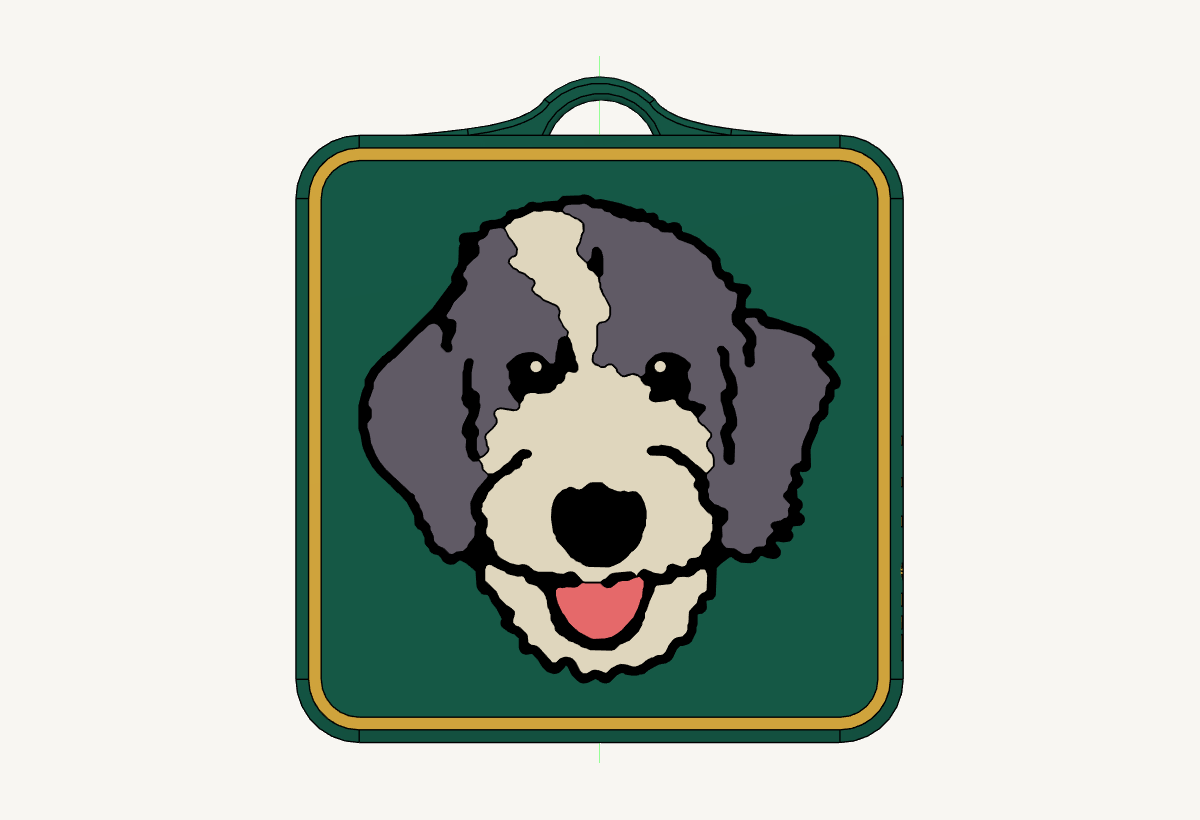
Did Claude take my job again, or did it simply save me from the non-value-add sloggery of raw 3D CAD work?
I spent 6 years building the technical skills to create 3D printed models and 3D renderings in CAD. I built this whole process for making printable NFC tags: the models, the adjustments for printability, all of it, because it's a real product you can actually print.
This process took me many, many, many hours to develop, and to be honest, a lot of it was non-value-add sloggery. It was incredibly time-consuming, going through many iterations to get it right. What I realized is that the process was not necessarily producing the value relative to the time that I was putting into it. However, those hours were not entirely lost. It was the failures in the prints over many iterations that taught me the most and gave me my judgment.
Then I had Claude take one of the tag models in Fusion, swap the design for a JPEG photo of a dog, and create the SVG on the fly. Using my method, it cut the pocket bodies, re-extruded the body flush with the surface, adjusted the model, and made new SVGs quickly with my corrections.
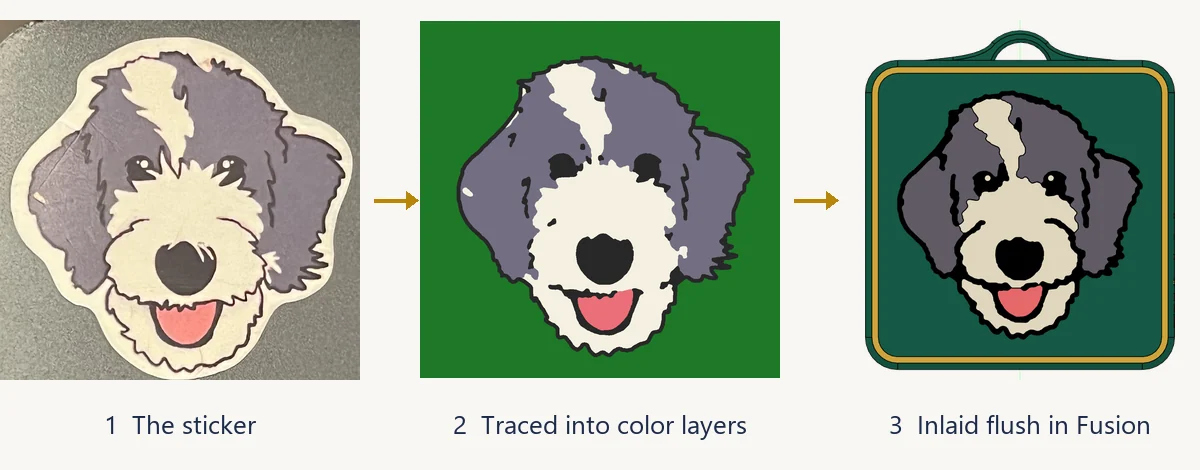
This is where it gets interesting and where my judgment shows up. All checks passed and they were true, but they only showed that the geometry was valid. They didn't show that it would print on a 3D printer. I caught the holes in the slicer. Claude also missed some key details, like the highlights in the dog's eyes. It told me it dropped these, but it didn't ask, and I had it put them back in for printability and visual appeal.
I also made judgment calls about what should remain in the existing model, such as the side text, the colors, and what ends up getting saved, because I knew who the customer was. Some of that checking is just missing tooling, and it'll probably get automated away. For example, Claude could have sliced the file itself.
The part that won't get automated away, no matter what, is how the physical print actually comes out, what the customer wants, and who is accountable for the quality of the product itself. The human is still the connection to the real world.
With that in mind, AI can now execute at a speed and scale that were previously impossible. This begs the question: what is the new elevated role of the human here?
Let's start with what's actually scarce now. The cost of making one attempt at a product, system, or process is collapsing to zero. Anyone can make an attempt now with AI, but that's the cost of a single attempt, not the cost of a good one. My tag shows it: a tag for your dog is one piece for one customer. The opportunity isn't one great tag; it's a lot of different n = 1s, one per customer.
The value is in speed and scale, and the math is a sum: every attempt × the odds it's actually good × what a good one is worth on the market for the customer. AI gets the making out of the way, so the limit becomes how fast someone can tell what's good.
Agrawal, Gans, and Goldfarb said this years ago: when prediction gets cheap, judgment gets more valuable.[4] By judgment they mean deciding what an outcome is actually worth, which is closer to what I call taste, and that's where the experience pays. It raises the hit rate and makes the checking faster. That experience came from the slog, not the sloggery. That's what gave me the eye to catch those mistakes. I wondered if that was simply cope, but it's not just cope.
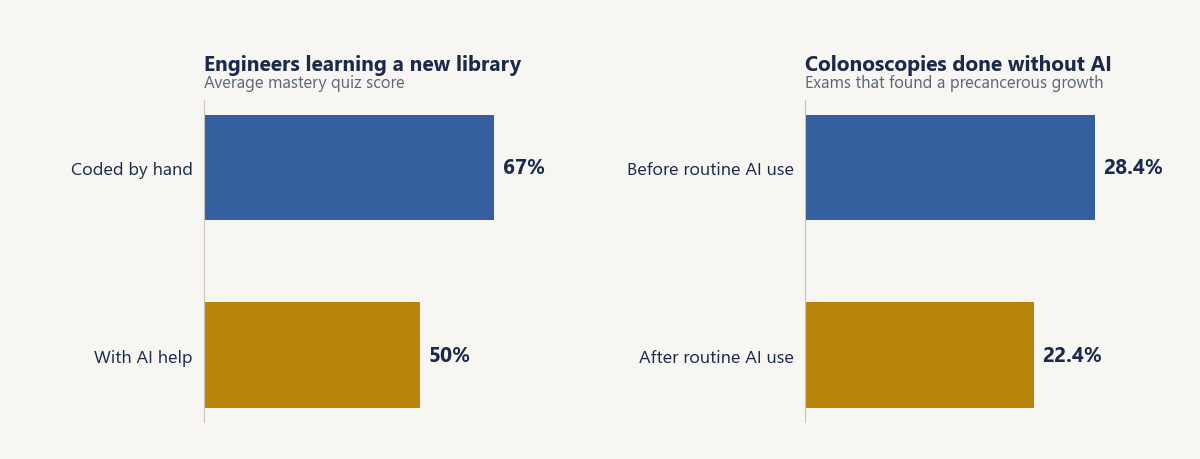
Anthropic's own study from January 2026 found that engineers learning a new library with AI scored 50% on a mastery quiz, while the ones coding by hand scored 67%.[1] The biggest gap was in debugging, which is the eval skill, and the AI group wasn't significantly faster either.
Doctors who got used to AI in colonoscopies found fewer precancerous growths when they worked without it: 28.4% down to 22.4%.[2] That one's an observational study, so it shows a link, not proof. The hours alone don't explain the eye. The amount of structured practice one puts in only explains about 12% of the differences in performance across studies and under 1% in professional fields.[3] That should humble anyone who thinks years equal skill, me included.
The research doesn't say what the rest is. My bet is that it's feedback: the prints that fail, not the time.
What is judgment? I hate the term at this point because it's so trite, just a catch-all. Judgment is the discernment generated through many, many, many failures against a known benchmark of excellence, where you get fast, clear feedback on your attempts. It's not really the failures that count. It's committing to an expectation, seeing the result, and comparing the two.
In the Anthropic study, people who used the AI to ask conceptual questions tended to score higher. The groups were small, so it's a hint, not proof, but it fits.
Do you need a known expert for the benchmark? Not always. Sometimes reality is the benchmark. The print holds or it fails, and no one has to tell me my first layer didn't stick. Sometimes it's an expert or a set of excellent examples to measure against. The faster and clearer reality's feedback is, the less you need the expert.
At the expert level, you're deciding what the benchmark should be when no one has set one. What makes a dog tag what it is? What makes an NFC dog tag good rather than just printable? Judgment measures against the bar. Taste sets it.
That loop is what AI changes. With AI, each feedback loop is shorter, so you get far more of them per hour. The other side of that is the catch: the failures AI handles on its own go by without you working through them. Claude told me it dropped the highlights. It didn't ask. If I hadn't stopped to look, I'd have lost a call that mattered and never learned why it was a call at all. So AI speeds up judgment only if the human commits to an expectation before seeing the answer, sees the failure personally, and puts in the time and mental capacity to understand what the failure was and why it happened.
Schools were supposed to build exactly that, and if you hire, that's where your juniors come from. Traditional education teaches you how to learn and how to think by giving you a fixed box to fail inside of, without the real-world implications. In school, if you fail, you get a bad grade and maybe repeat a class. In the real world, you suffer reputational risk and financial ruin. There are real implications for being a fucking loser in the real world. So we give you a big box to learn inside of, and we simulate the downside with grades. For high school and college students, that box works when it's designed right: letting them struggle with a problem before you teach the answer beats teaching first.[6] But grades make failure costly inside the box. I think the people who optimize for grades learn to avoid failing, and that's exactly the reps they needed. Grades do predict job performance, moderately at best.[7] The real world does not give a fuck if you made an A or not.
Now add AI to that box. From a traditional education standpoint, generative AI as it currently stands is insufficient. It's built to solve the problem, not to make you learn from failing at it. What we need are AI systems that force you to engage with the failures and wrap them back into your worldview. It can be done. Harvard built an AI tutor for intro physics that guided students step by step, and it more than doubled their learning gains over an active-learning class.[5] One course, 194 students, but the design matters.
The same goes for your team. So what does the job look like now? The human sets the bar, the AI produces the volume, and the human judges it and owns it. The value sits in the benchmarks, the calibration and knowing the customer. To do that job, you have to learn how to learn with AI: the reps of failure against a benchmark, with feedback loops you can observe and rework back into your judgment. That's what makes human plus AI fast, and that speed and scale of iteration is the new market value.
If you lead a team, here's the part that's on you. Your juniors are learning with AI right now, on your work. If AI does all the junior work, they never get the reps that built my eye, and you end up with people who can produce anything and can't tell what's good. Schools should focus on this too, but you can't wait for them. Build the practice on purpose:
- Make them commit first. Before they ask the AI, they write down what they expect. Then they compare.
- Make the calls visible. Have the AI show what it fixed and what it cut, and ask before it cuts anything. Then go over those calls with them.
- Give them a benchmark. Show them what excellent looks like, your best past work, and give them real-world checks that don't lie, like a test print.
- Review the calibration, not just the output. Ask what they expected, what happened and why. The finished product proves less than it used to, because AI can make it in seconds.
- Make production mode something they earn. You can't watch every failure, or you lose the speed. So where they're still learning, they commit first, watch the failures and work out why. Where they're already calibrated, they let the AI execute and spot-check it. Knowing which one they're in is the skill you're building.
That costs you some speed today. It's what makes the speed worth anything later.
So did AI take my job, or save me from the non-value-add sloggery? No, it didn't take my job. It did save me from the non-value-add sloggery. But it didn't save me from the slog. It just changed what the slog was. The judgment you need to truly use the speed and scale of AI still takes slogging: observing my failures and building the feedback, continuously. Sorry, guys, we're not saved from the slog just yet, but that's probably for the best.
Build notes: the dog tag in Fusion 360
For anyone who wants the how. This is the session the essay is about, step by step.
The setup. Fusion 360 now ships with its own MCP server, a local connection that lets an AI agent read a design and run scripts inside Fusion. I pointed Claude Code at it. Claude worked on a copy of one of my existing tag files and saved only when I said so.
1. Trace the photo. Claude turned a phone photo of a dog sticker into flat color layers: a black outline, gray fur, cream fur, a pink tongue and two eye highlights. Each layer became its own SVG, about 39 mm across.
2. Inlay it. This is my method from the old lettering. Import the SVGs onto the front face, cut a 0.7 mm pocket in the shape of the dog, then re-extrude each color as a new body that fills the pocket exactly flush with the surface. Ten bodies in all, so the slicer can give each one its own filament color and the face prints flat.
3. The checks. Claude verified the geometry: every body flush, nothing overlapping, and the filled volume matching the pocket. All true. None of it said the tag would print.
4. The slicer. In Bambu Studio, the face had holes where details were smaller than the printer can lay down. Claude rebuilt the trace to print: specks merged into their neighbors, thin outline strands thickened, and the eye highlights sized up to 1 mm.
5. The calls. I had it put the eye highlights back, kept the side text and the QR code, chose the colors (green base, gold frame, gold side text and QR) and decided what got saved.
What would close the loop. Bambu Studio can slice from the command line. Wire that in and Claude could catch the holes itself. It still couldn't tell you whether the tag is any good.
How to connect Claude to Fusion 360
Fusion 360 has its own MCP server built in. It runs on your computer while Fusion is open and lets Claude read your design and run operations in it. There is nothing to download.
-
Turn on the server in Fusion
Open Fusion 360. Go to Preferences > General > API and tick Fusion MCP Server (runs locally on this device). While Fusion is open, the server listens at
http://127.0.0.1:27182/mcp. -
Connect Claude
Two options:
- Claude Desktop: open Settings > Connectors > Browse connectors, search for Fusion and install Autodesk Fusion. No URL needed.
-
Claude Code: run this once:
claude mcp add --transport http autodesk-fusion http://127.0.0.1:27182/mcpOr put it in a project's
.mcp.jsonso it travels with the folder:{ "mcpServers": { "autodesk-fusion": { "type": "http", "url": "http://127.0.0.1:27182/mcp" } } }Start Claude Code in that folder and approve the server when it asks.
-
Check the connection
In Claude Code,
/mcpshould list autodesk-fusion with four tools:fusion_mcp_readreads the open design,fusion_mcp_executeruns operations and scripts in it,fusion_mcp_updateundoes and redoes, andfusion_mcp_electronics_readreads Electronics documents. -
Try it
Open a design in Fusion and ask: Create a 10 mm cube.
Before you build
- It works on the live document you have open. Save a version in Fusion before big changes.
- Tell it when to save. In my session it saved only when I said so.
- The server only runs while Fusion is open with the preference ticked. If Claude can't connect, check those two first.
- If you change the port in Fusion, change the URL to match.
Sources
- Shen and Tamkin, Anthropic, Jan 2026. Research page.
- Budzyń et al., The Lancet Gastroenterology & Hepatology, 2025. Endoscopist deskilling after exposure to artificial intelligence in colonoscopy: a multicenter observational study.
- Macnamara, Hambrick and Oswald, Psychological Science, 2014. Summary of the meta-analysis.
- Agrawal, Gans and Goldfarb, NBER, 2018. Working paper w24243.
- Kestin et al., Scientific Reports, 2025. Full paper.
- Sinha and Kapur, Review of Educational Research, 2021. Summary of the meta-analysis.
- Roth et al., Journal of Applied Psychology, 1996. Abstract listing.
Subscribe to Agentic Alley.
A newsletter on what Atlanta companies are doing with AI, and what it's worth.
SZD Labs is independent and not affiliated with Anthropic or Autodesk. Claude is a trademark of Anthropic, PBC. Autodesk and Fusion are trademarks of Autodesk, Inc.