From personal Claude plans to Claude Team.
Claude Team moves everyone who pays for Claude on a personal card into one company organization: one invoice, admin controls, shared projects, and no model training on your chats by default. A Standard seat costs $25 a month, or $20 billed annually, and includes Claude Code. This guide shows every screen that changes, what happens to each person's personal account when they join, and the twelve-step rollout we use.
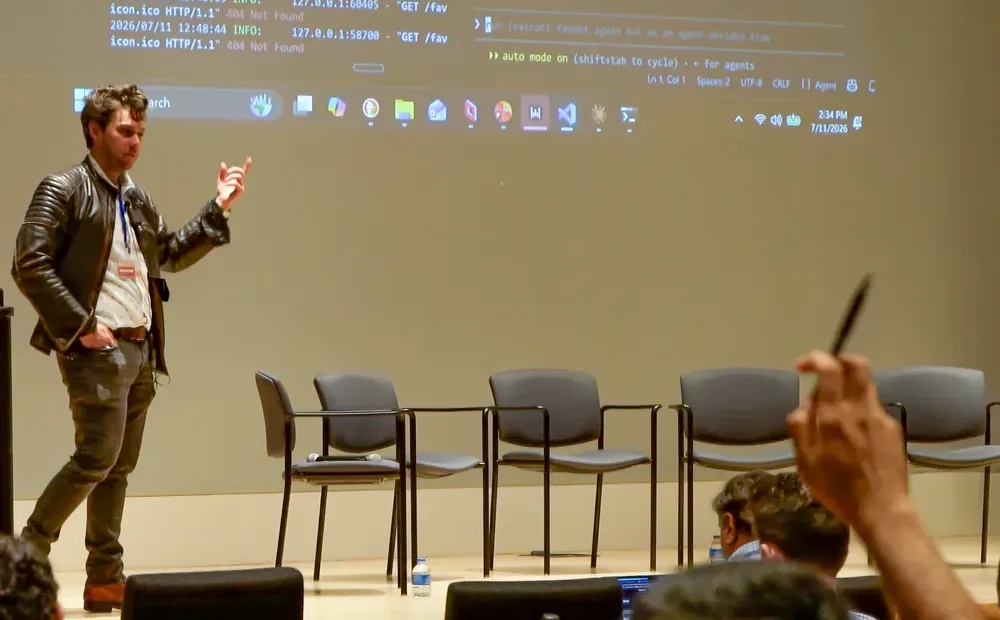
Tyler teaching at a free Claude Community workshop with IEEE Atlanta, held at Georgia Tech Research Institute, July 2026.
Personal plans are built for one person. Team is built for the company.
Most companies start with a few people expensing Pro or Max. It works until someone asks where the client data went, who owns the project everyone depends on, or why five people pay for the same thing five different ways.
One invoice
The company pays per seat on one bill, instead of reimbursing personal cards and app store subscriptions.
No training by default
Team runs under Anthropic's Commercial Terms. On Free, Pro and Max, each person decides for themselves.
One set of rules
Owners decide sharing, connectors, skills, memory and what Claude may do without asking, once, for everyone.
Projects outlive people
The project everyone depends on belongs to the organization, not to whoever happened to build it.
The one rule for your rollout: configure the org first and invite people second. Most of the defaults are open, and the invite link is live from day one.
Personal plans vs. Claude Team.
| Personal (Pro or Max) | Claude Team | |
|---|---|---|
| Who pays | Each person, on their own card or app store | The company, on one invoice |
| Price | Pro $20 a month ($17 billed annually). Max $100 or $200 a month | Standard seat $25 a month ($20 annually). Premium seat $125 a month ($100 annually) |
| Size | One person | 2 to 150 seats |
| Model training on your chats | Each person's own choice | Off by default, under Anthropic's Commercial Terms |
| Who owns the work | The individual | The organization |
| Admin controls | None | Admin console, roles, domain verification, SSO, org policies |
| Sharing | Public links | Projects and chats shared inside the org, within admin limits |
| Connectors and skills | Each person sets up their own | Owners turn them on for everyone |
| Claude Code | Included | Included in every seat, with org managed settings |
| Usage | Pro is the baseline; Max is 5x or 20x Pro | Standard about 1.25x Pro and Premium about 6.25x Pro per session, plus optional usage credits |
Prices in US dollars before tax, as Anthropic listed them on October 26, 2026. Usage multiples are Anthropic's own per-session figures from its help center.
Joining a Team doesn't erase anyone's personal account.
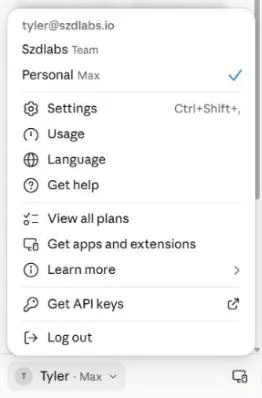
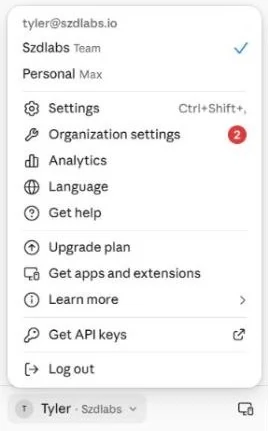
One email can hold a personal account and an organization account at the same time. People switch between them from the account menu in the lower left corner. The blue check shows which one is active, and each account keeps its own chats.
What this means for your people
- They decide what moves. When they accept the invite they can keep both accounts, or move their personal history into the org. Moving accounts covers the choice.
- Work goes in the work account. Tell people plainly: client work, company files and shared projects live in the Team account from day one.
- Check the corner before you paste. The most common early mistake is working in the wrong account. The name next to the avatar tells you which one you are in.
The strongest reason to move, and the easiest to miss.
Since Anthropic's 2025 consumer terms update, Free, Pro and Max users choose for themselves whether their chats and coding sessions train Anthropic's models, and Anthropic keeps that data for up to five years when they allow it. Team runs under the Commercial Terms instead: by default, Anthropic doesn't train on Team chats or coding sessions.
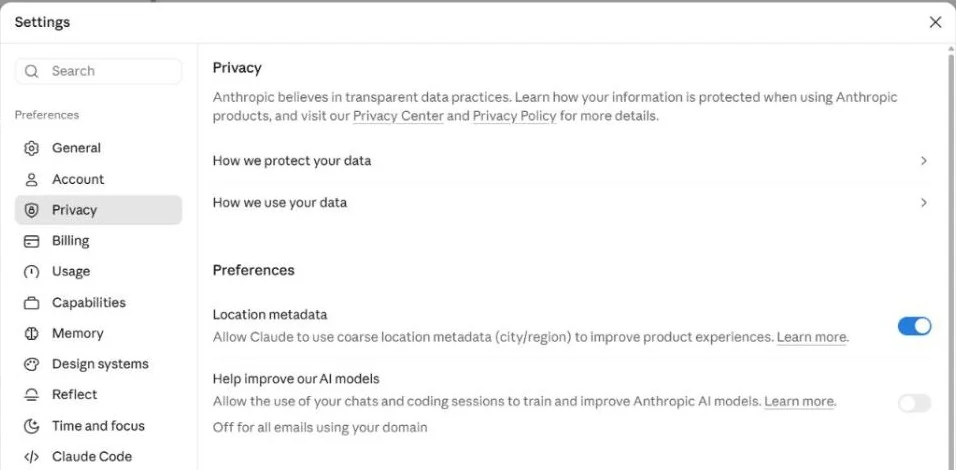
A side benefit we saw in our own org: once the company domain was verified in the Team org, the personal account on that domain showed training switched off for every email on the domain. Verify your domain early (rollout step 4).
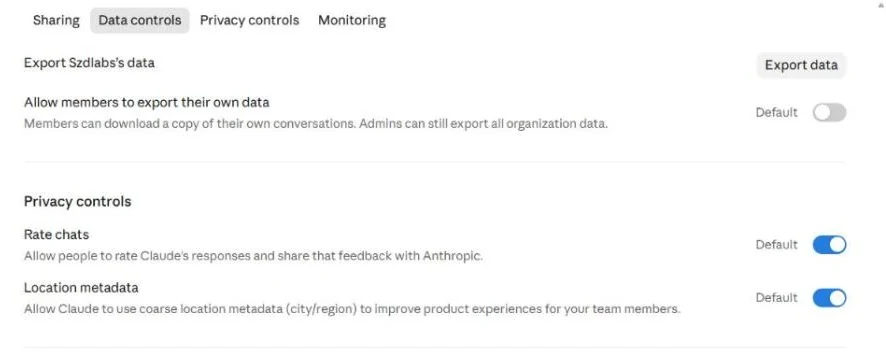
Exceptions Anthropic lists for Team: feedback people submit with thumbs up or down, an explicit opt in, and its Development Partner Program. Chats stay until deleted, and deleted chats leave Anthropic's back end within 30 days. Custom retention periods are an Enterprise feature.
Every setting for the whole company, in one place.
Owners and Admins open it from the account menu, Organization settings. The left rail is the map: organization, billing, usage, data and privacy, capabilities, members, then one page per product.
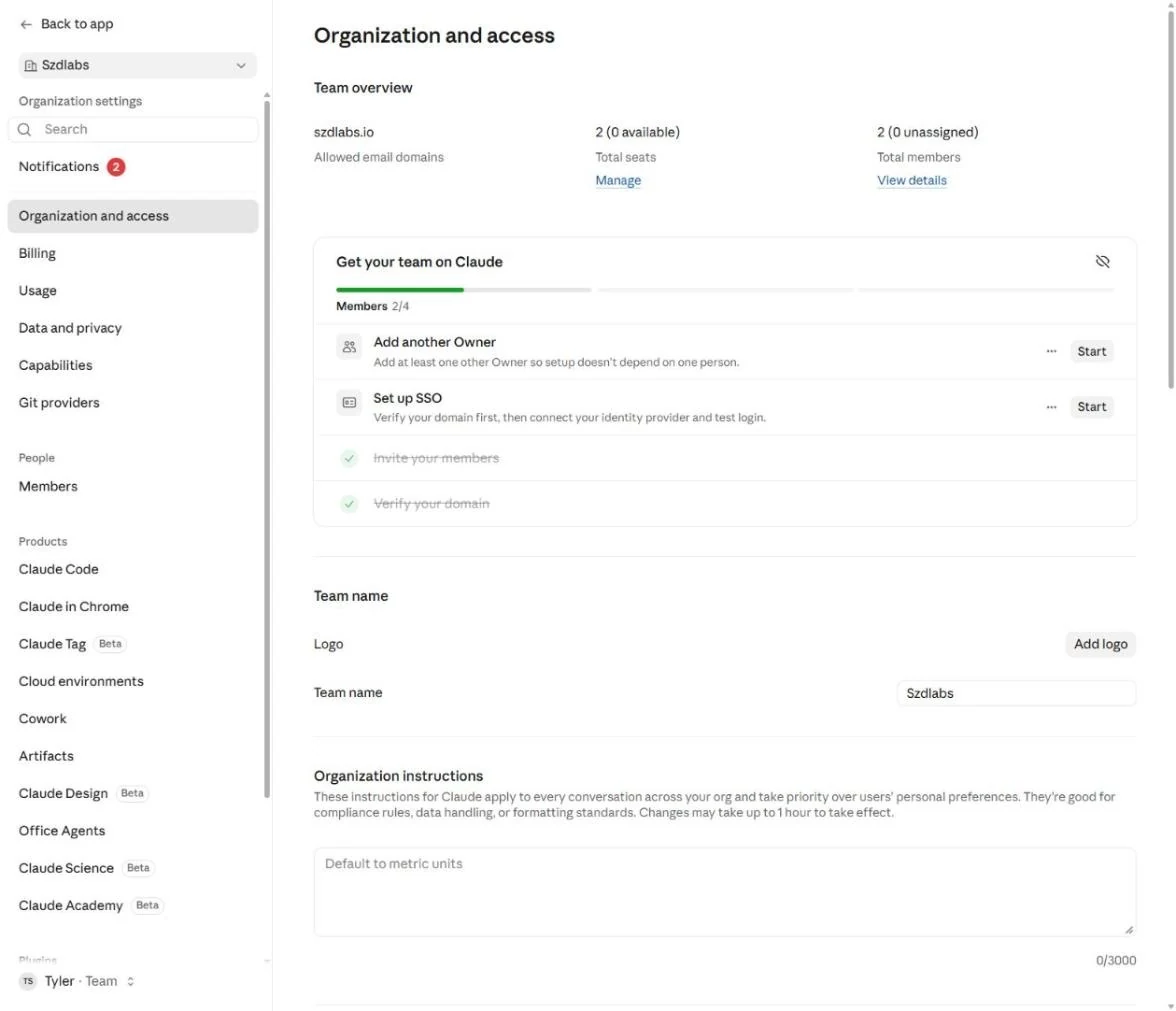
Use Organization instructions for the few rules that should never depend on memory: how to handle client data, required disclaimers, house formatting. Changes can take up to an hour to apply.
Who can do what, and who gets the bigger seat.
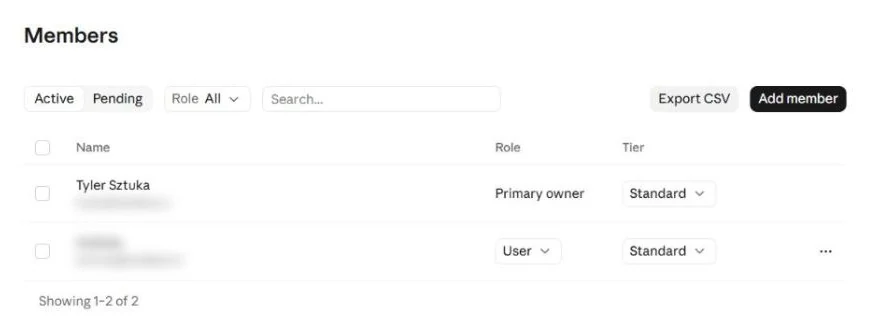
Four roles
Primary Owner
One per org. Owns the org's data and can request a full export.
Owner
Buys seats, sets policy, and manages Admins and Owners.
Admin
Invites and removes members.
User
Uses Claude.
Two seat types
Standard covers most people and includes Claude Code. Premium adds usage, about five times a Standard seat. Mix them freely and move people between them as their use changes. Members don't see which seat they have.
New seats are prorated and charged right away. Seat reductions only take effect at renewal, with no prorated refund, so add seats as you need them rather than all at once.
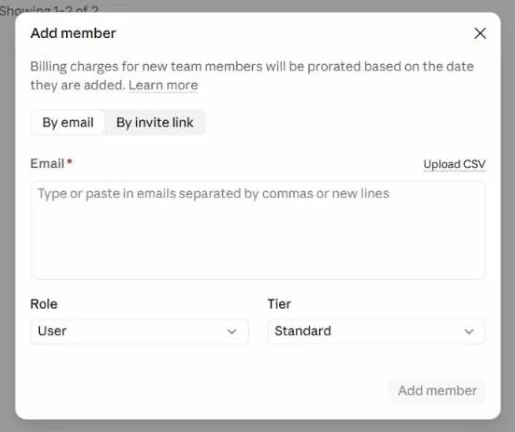
Watch your seat count: a pending invite holds a seat as soon as it is sent, and invites expire after 21 days.
Add a second Owner on day one. The setup checklist asks for it for a reason: if the only Owner is out, nobody can buy seats or change policy.
One invoice, and a plan for your heaviest users.
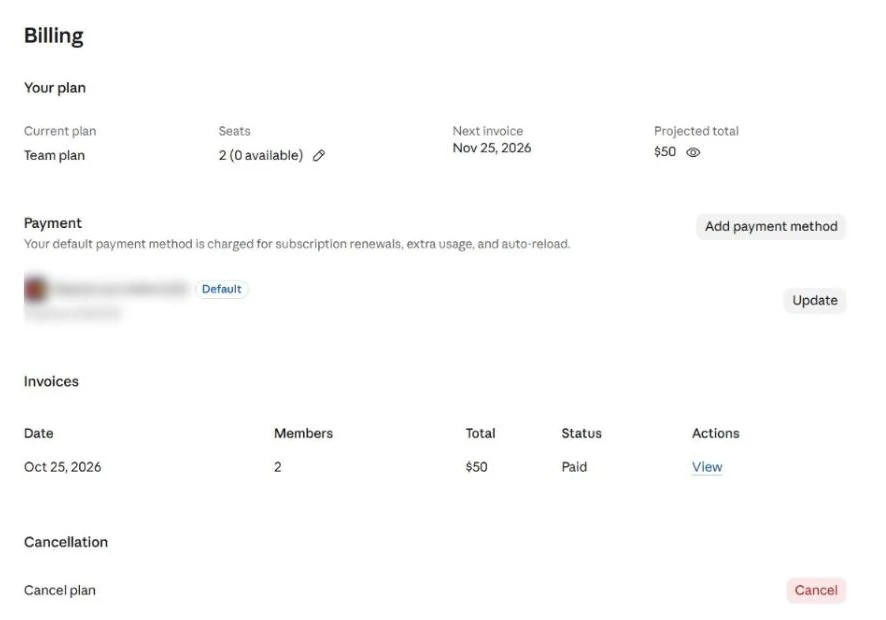
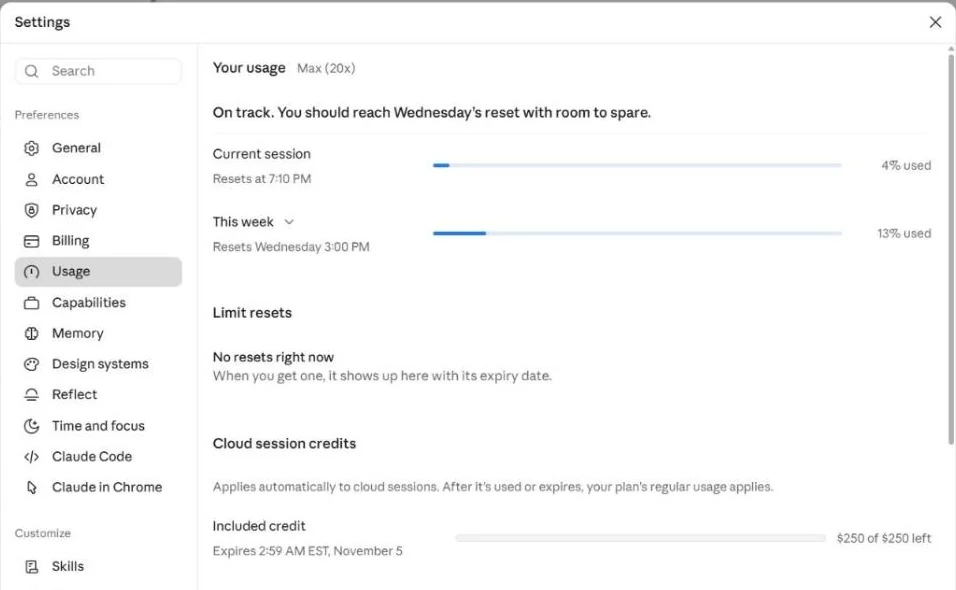
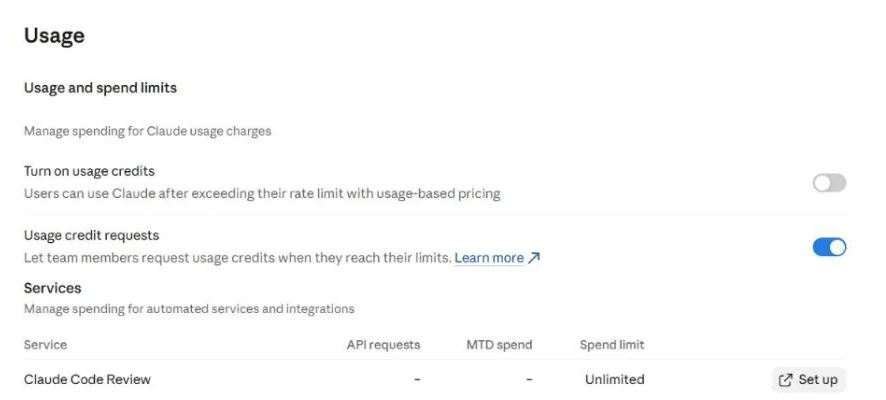
Your Max 20x people will notice. A Premium seat is about 6.25 times Pro per session; Max 20x is 20 times. If someone lives in Claude Code all day, turn on usage credits with a monthly cap for the org and per person, or expect complaints in week one.
Since October 7, 2026 Team plans also earn monthly API credits ($20 per Standard seat and $100 per Premium seat, pooled and capped at $500 a month) once a Console organization is linked after seven days on the plan. Unused credits expire each cycle.
The project everyone depends on stops living in one person's account.
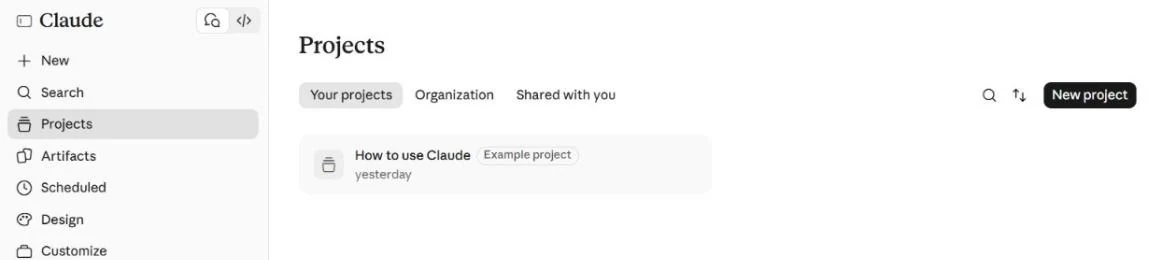
On a personal plan, a great project (instructions, reference files, a working prompt) belongs to whoever built it. In a Team org it can be shared with specific people, or published to the whole company under the Organization tab.
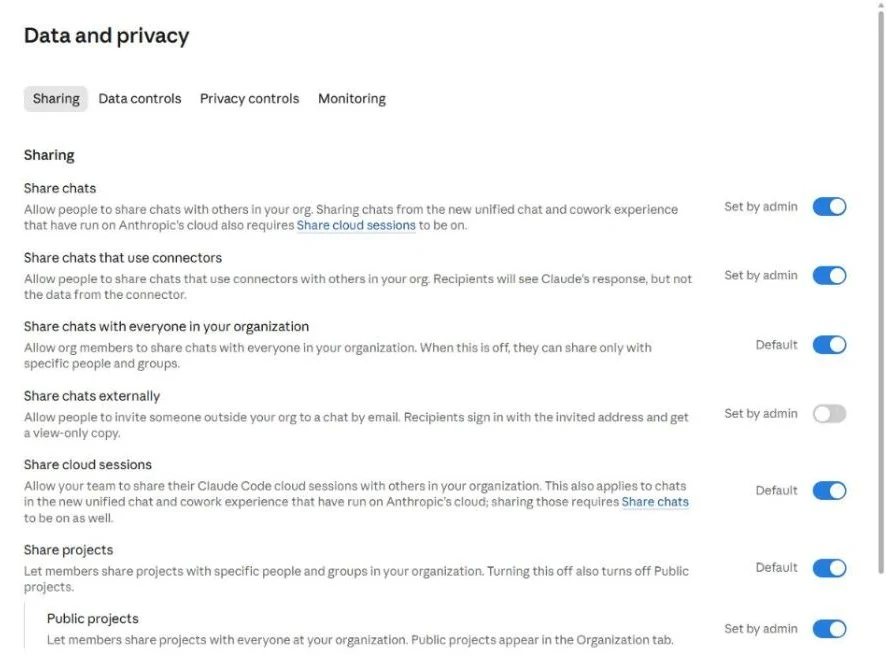
Our default settings for a new org
- Share projects and Public projects: on. This is where the value compounds. Seed two or three company projects before you invite anyone.
- Share chats externally: off until you have a reason. It lets people invite outsiders to a chat by email.
- Share chats that use connectors: your call. Recipients see Claude's answer but not the underlying connector data.
Turn a tool on once instead of twenty times.
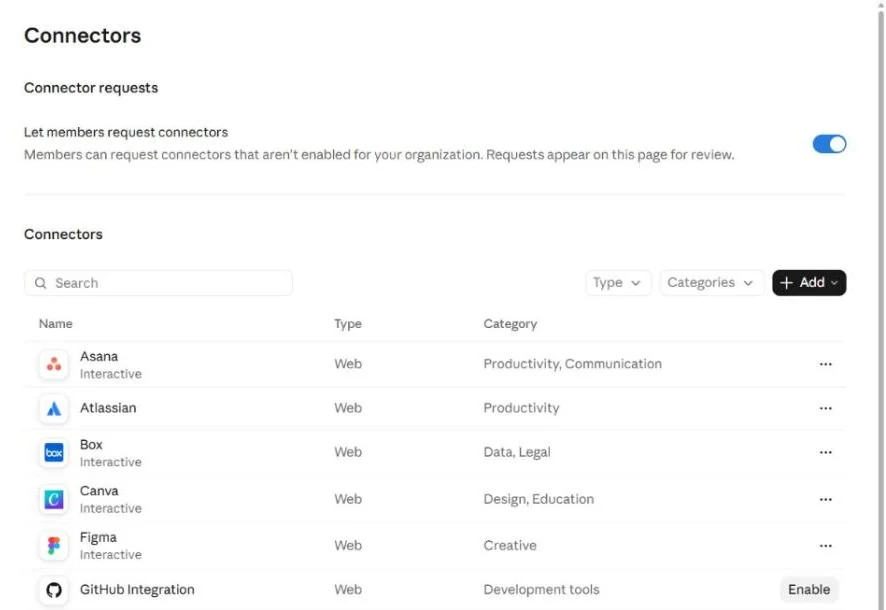
- Keep "Let members request connectors" on. Requests land on this page, which tells you what people actually need.
- Only Owners can add custom connectors on Team, and Owners can set each connector tool to always allowed, needs approval, or blocked.
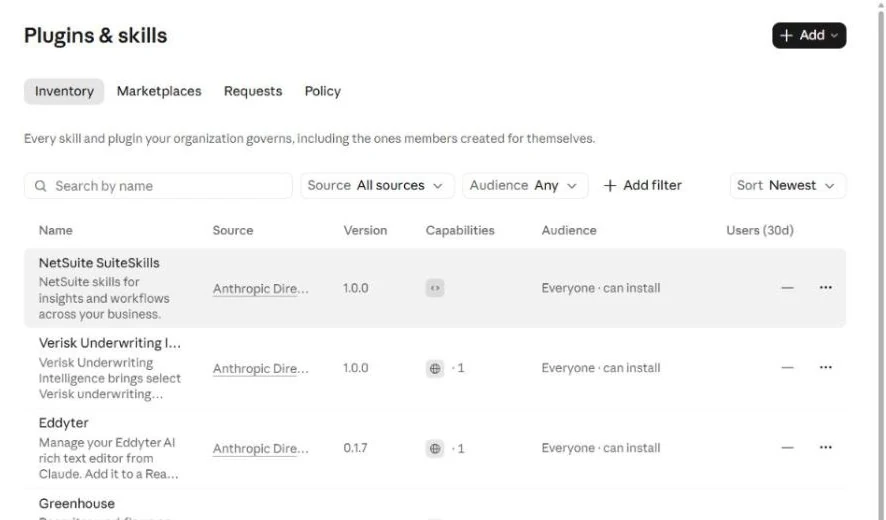
- Skills work the same way. Owners upload company skills under Plugins and skills and every member gets them. Skills need code execution turned on.
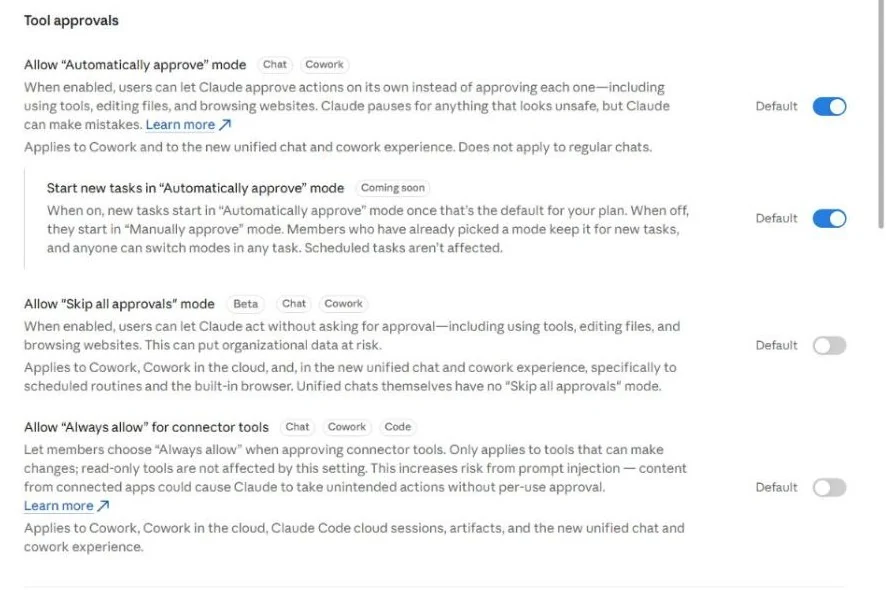
Decide how much Claude can do without asking.
Capabilities is where you set the org's risk posture. These switches apply to every member, so set them before people arrive.
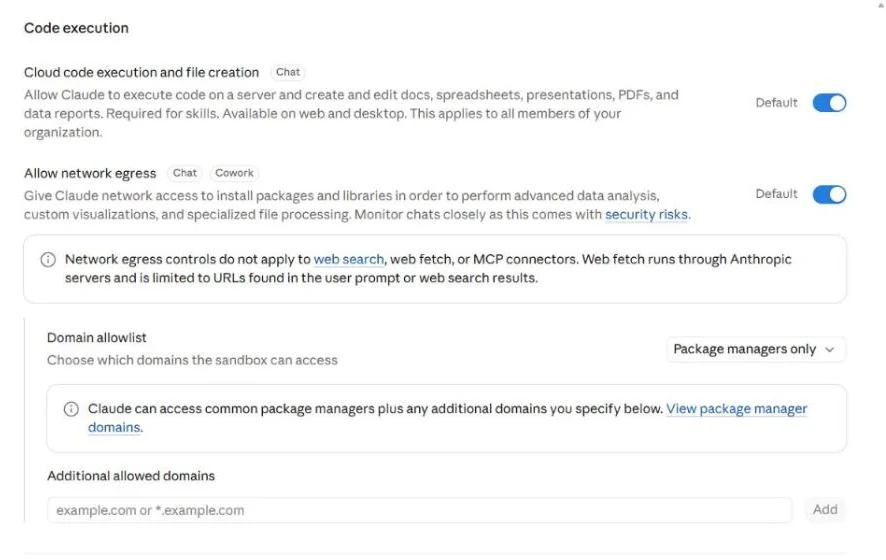
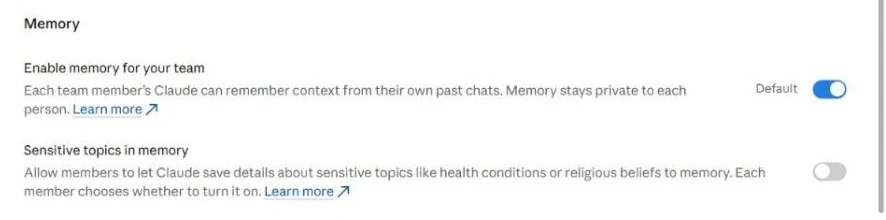
Decide memory on purpose. Anthropic's release notes and our live org didn't agree on the default, so check the switch rather than assume.
Every seat includes Claude Code. Set the rules before the developers do.
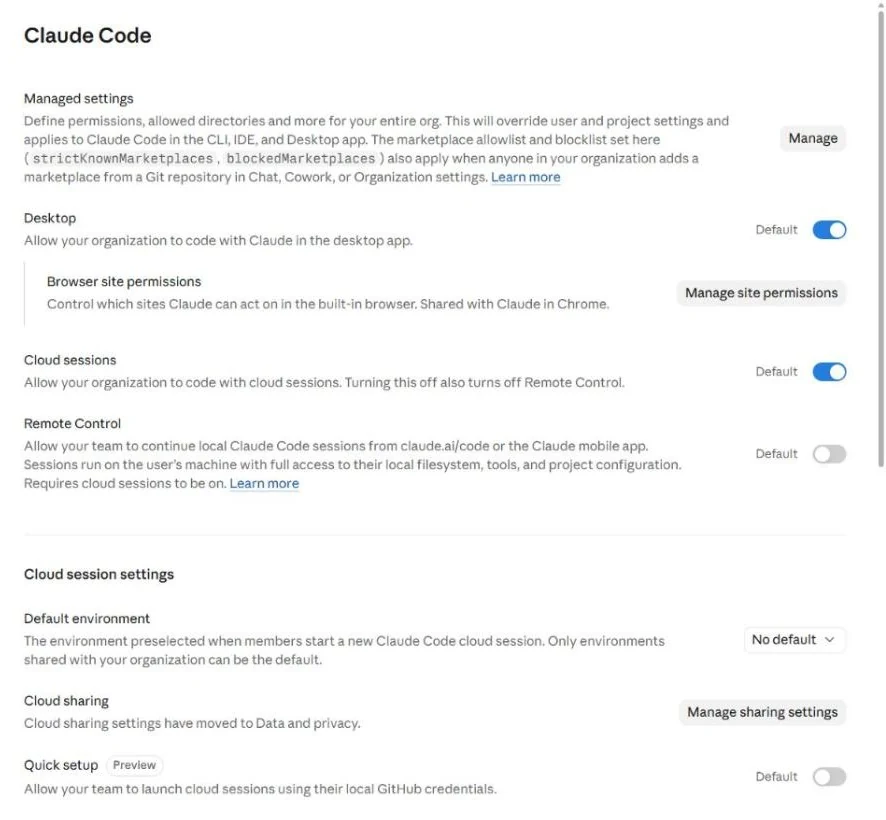
- Managed settings override user and project settings across the CLI, IDE and desktop app: permissions, allowed directories, plugin marketplaces. They need Claude Code 2.1.38 or later. One policy covers the whole org on Team, and Anthropic describes them as a client-side control, not a security boundary.
- Cloud sessions and Remote Control let people run or continue coding sessions from the browser or phone. Remote Control gives a session full access to that person's machine, which is why it ships off.
- Fast mode bills from usage credits at a higher rate, so it only works once credits are on.
Three choices at the invite, and one of them is final.
When someone with a personal Pro or Max plan on the same email accepts the invite, Claude asks what to do with the personal account.
| Choice | What happens | Best for |
|---|---|---|
| Keep both | The personal account stays as it is. Nothing moves, and the personal subscription keeps billing. | People who use Claude for life outside work too |
| Move to the org, bring data | The personal account closes. Chats, projects and memory move into the org. Pro or Max is cancelled with a prorated refund. | Accounts used only for work |
| Move to the org, delete data | The personal account closes with a prorated refund. Nothing moves. | A clean start |
Moving is one way. Once history moves into the org, the company owns it. Anyone who mixed personal and work use should keep both and rebuild the few work projects they need inside the org.
What moves
- Chats and the artifacts inside them
- Projects, project instructions and files
- Memory
- Some Claude Code personal settings
What doesn't
- Custom skills and custom connectors
- Connector and app sign-ins
- Published artifacts and public share links, which stop working
- Cloud sessions for Claude Code and Cowork
The Apple trap. Refunds are automatic for plans bought on the web or through Google Play. If someone pays through the Apple App Store, moving doesn't cancel it. They must cancel in their Apple ID settings, or Apple keeps charging.
People who change their mind later can still move: Settings, Account, "Close your personal account". A person can also belong to more than one Team or Enterprise org.
Configure first, invite second, lock down last.
Anthropic doesn't publish a rollout order. This is the one we use.
- Before you start
Take inventory
Who pays for Claude today, on which plan, through which store. Who uses Claude Code daily. Who has public links or published artifacts other people rely on.
- Before you start
Pick seats
Standard for most people. Premium for the people who hit limits on Max today.
- Day one
Create the org
At claude.ai with a company email; Gmail and other public domains can't create one. Choose Team, then monthly or annual billing. Buy only this week's seats.
- Day one
Verify the domain
And add a second Owner. The setup checklist walks you through both.
- Day one
Set the policy
Sharing, capabilities and memory, connectors and skills, Claude Code managed settings, Organization instructions, usage credits and caps.
- Day one
Seed projects
Two or three company projects with the instructions and files people need on their first day.
- Week one
Invite by email
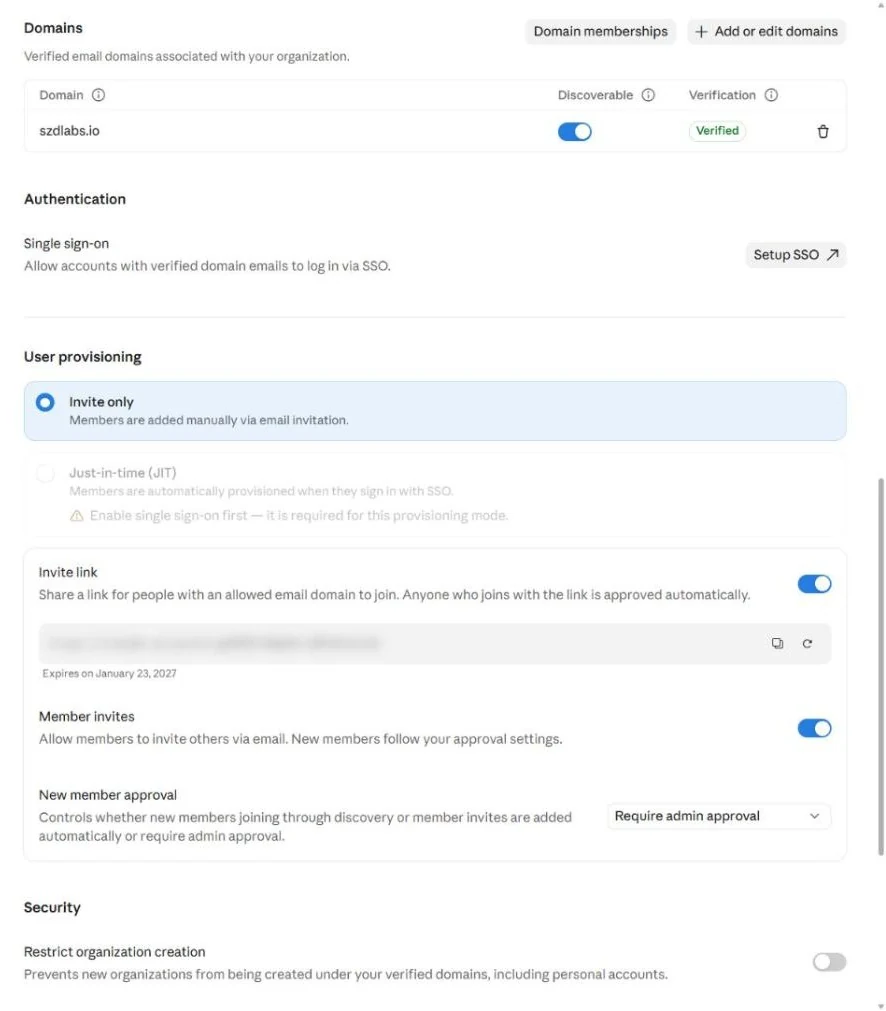
Email invites set each person's role and seat. The invite link is on by default, approves anyone on an allowed domain and gives the lowest seat. Turn it off until you want it.
- Week one
Send a short note first
Which account choice to make, the Apple App Store warning, and where the company projects are.
- Week one
Rebuild what didn't move
Each person signs back in to their connectors, re-adds custom skills and replaces public links that broke.
- Weeks two to four
Restrict new orgs
Turn on "Restrict organization creation" so nobody starts a new personal account or side org on your domain. Existing accounts aren't touched.
- Weeks two to four
Set up SSO
Add every user to the identity provider app first. Requiring SSO locks out personal accounts on your domain that aren't in the app, so warn people to export first.
- Weeks two to four
Review usage weekly
For the first month: move people between Standard and Premium, adjust credit caps, approve connector requests.
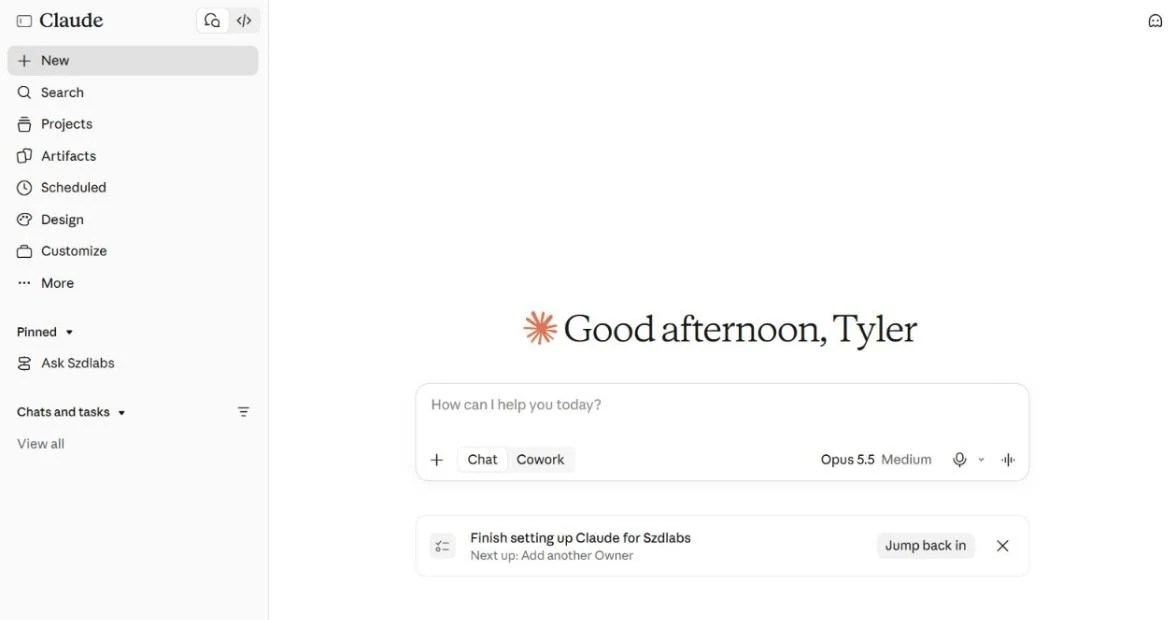
Know the line before you sign.
Team covers most companies under 150 people. Look at Enterprise if you need any of these:
- More than 150 seats
- SCIM provisioning or audit logs
- The Compliance API or custom data retention
- Claiming personal accounts that already exist on your domain
- Custom roles, groups, or skills for some groups only
- IP allowlisting, customer-managed encryption keys or US-only inference
- HIPAA readiness with a BAA
- Usage-based billing without per-seat caps
A self-serve upgrade from Team to Enterprise keeps chats, projects, members and roles, and can't be reversed.
The one-page checklist
- Inventory who pays for Claude today, and how
- Create the org with a company email; buy this week's seats
- Verify the domain; add a second Owner
- Set sharing, capabilities, memory, connectors, skills, Claude Code and usage policy
- Write Organization instructions; seed company projects
- Turn off the invite link; invite by email with role and seat
- Tell people which account choice to make, and warn Apple subscribers
- Rebuild connectors, skills and broken links
- Restrict organization creation; set up SSO
- Review usage weekly for a month
Sources
- Claude pricing
- What is the Team plan? and Purchase and manage seats on Team plans
- Move your personal Claude account to a Team or Enterprise organization
- Roles and permissions and Manage members on Team and Enterprise plans
- Manage usage credits and Monthly API credits
- How Anthropic uses personal data in model training and the 2025 consumer terms update
- Claude Code server-managed settings
The org is set up. Now teach the people in it.
SZD Labs runs hands-on Claude training for the teams who'll use it, built on your own work.
SZD Labs is independent and not affiliated with Anthropic. Claude is a trademark of Anthropic, PBC. Screens are from SZD Labs' own Team org on October 26, 2026, with names, emails, payment details and links blurred. Anthropic changes its plans often; check the sources before you buy.